
Right after you arrive on site
Here's how to route all the sound in the venue into EventCAT. Set up the audio signal path step by step, from the mixer to the laptop.
Right after you arrive on site
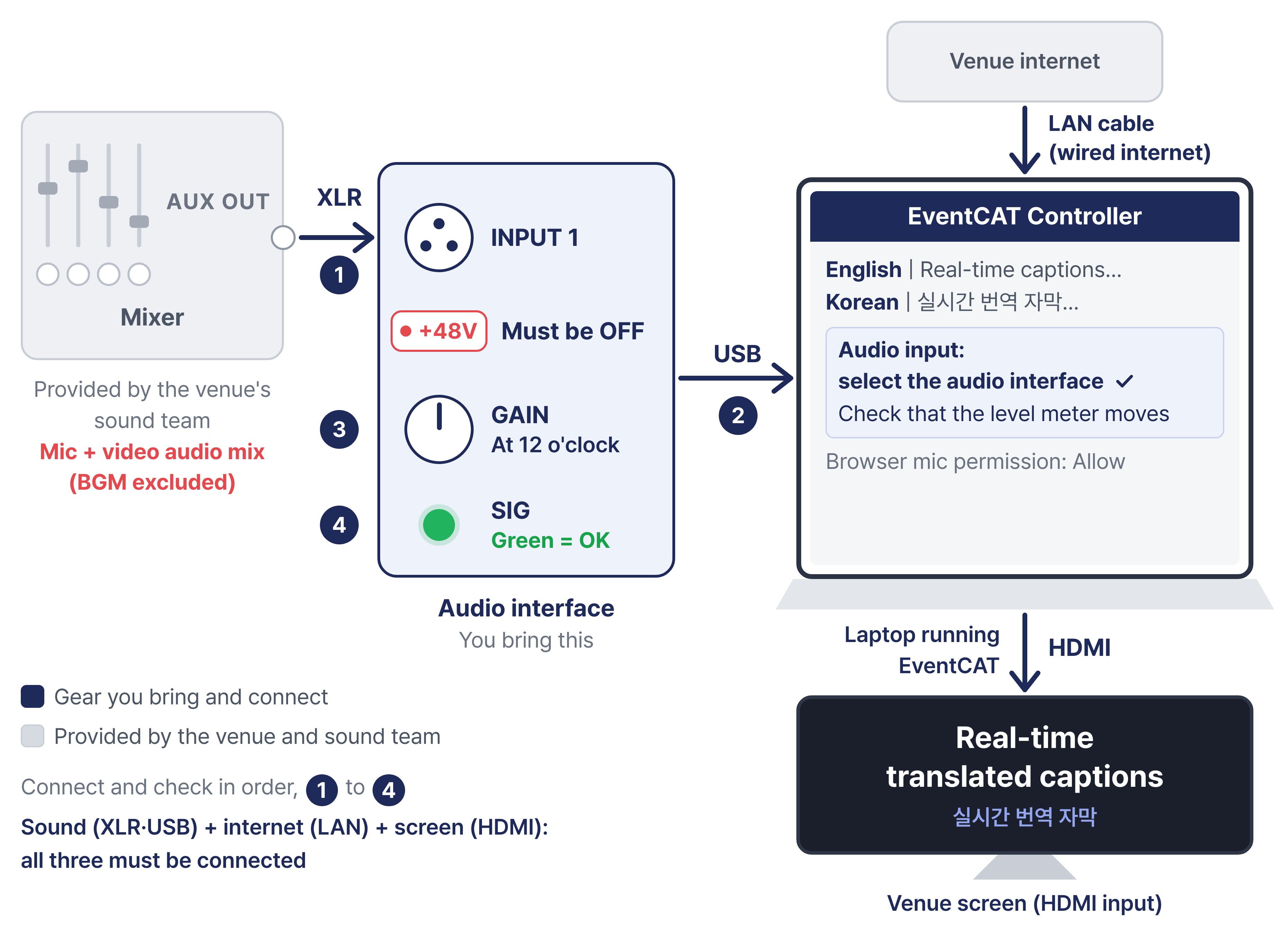
Mixer → XLR → Audio interface → USB → Laptop (running EventCAT) → HDMI → Venue screen (HDMI input)
- XLR: Connect the mixer's AUX OUT to INPUT 1 on the audio interface.
- USB: Connect the audio interface to the laptop.
- Set the GAIN knob to 12 o'clock. Keep 48V off.
- When the SIG light is green, sound is coming in.
- Mixer — Provided by the AV team. Mic + video mix, no BGM
- Audio interface — Bring your own
- Internet line · Venue — Connect to the laptop with a LAN cable (wired internet)
- EventCAT controller — Audio input: select the audio interface ✓ (check the level meter moves), browser mic permission: Allow
- Venue screen — HDMI input, shows real-time translated subtitles
Legend: Brought and connected by you / Provided by the venue or AV team
①–④ follow the connection steps in Connect the audio interface.
Setup is complete only when all three paths are connected: sound (XLR, USB), internet (LAN cable) and display (HDMI).