ITS World Congress 2026: 18 Sessions, One AI Translation Platform
If you produce academic conferences, you know the math problem. Breakout sessions run in parallel across a dozen rooms, presentations are dense with technical terminology, and staffing every room with interpreters, booths, and receivers is rarely in the budget. Most organizers end up interpreting the plenary and leaving the breakouts in a single language.
The 2026 ITS World Congress in Gangneung, Korea, took a different approach. The congress is the largest global event for intelligent transportation systems, and this year it drew more than 60,000 participants from 91 countries. EventCAT served as the first official AI translation partner in ITS World Congress history, delivering real-time AI translation and multilingual captions across the academic program for all five days.
"For an international event bringing together participants from more than 90 countries, communication without language barriers was essential. But budget constraints meant that placing simultaneous interpreters in every room was never realistic. EventCAT turned out to be the answer. This event showed us that smaller cities can successfully host large-scale international events with AI translation."
— Decision-maker responsible for adopting EventCAT, 2026 ITS World Congress
The academic sessions took place at the newly opened Gangneung Convention Center, and EventCAT was installed there without interpretation booths or receivers to support 18 concurrent sessions.
How EventCAT Was Used at a Glance
Scale: 18 concurrent sessions, one EventCAT Conference account, five days (October 19–23, 2026)
Operations: All sessions monitored from a single dashboard
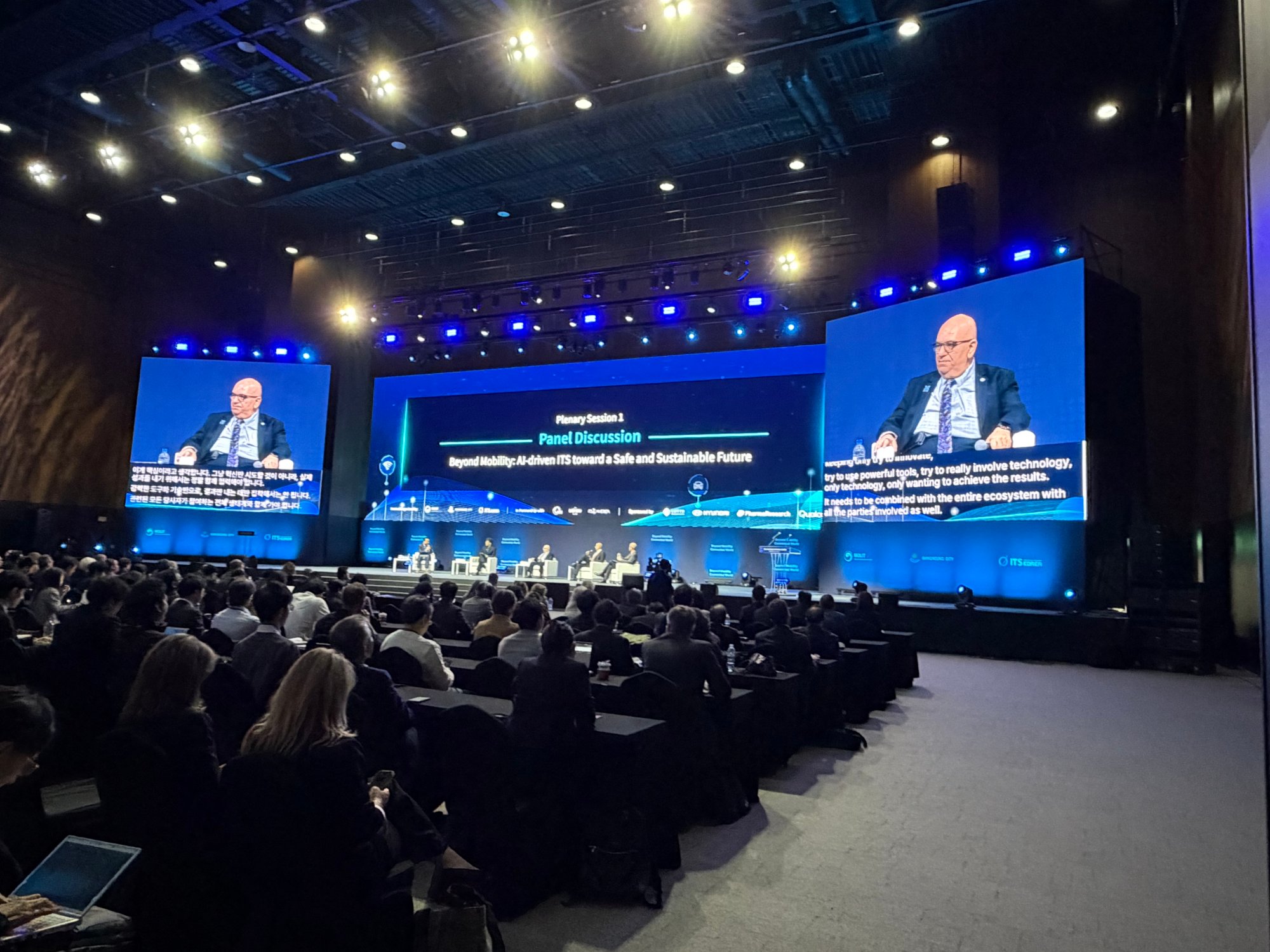
Plenary hall: Translated captions delivered on the live broadcast screen
Breakout rooms: Floating view placed captions over slides and video, no screen splitter needed
Youth sessions: A dedicated monitor showed translated captions only
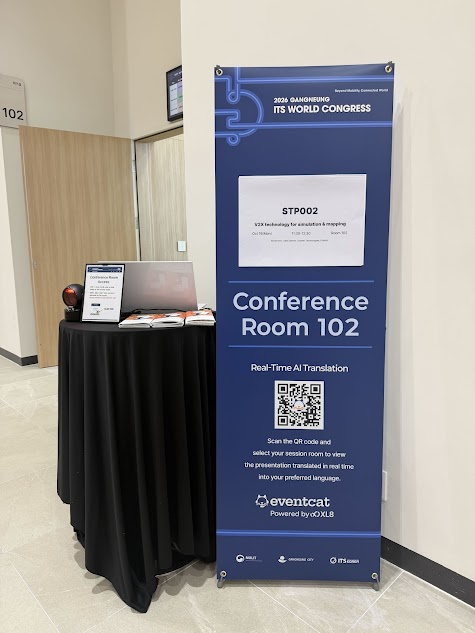
Personal devices: Attendees scanned a QR code to read or listen on their phones
Terminology: Glossary pre-loaded with terms such as C-ITS and MaaS
Why Multi-Track Conferences Are Hard to Translate
ITS World Congress combines ministerial meetings, academic sessions, an exhibition, and technical tours. This year, around 180 sessions on autonomous driving, AI-based traffic management, and mobility policy ran in parallel across the convention hall and meeting rooms, with speakers and attendees from Asia, Europe, and the Americas.
For conference organizers, that format creates three familiar problems:
Cost scales with every room. Traditional simultaneous interpretation means interpreters, booths, and receiver kits per room. Once you pass ten breakout rooms, cost, staffing, and logistics grow fast.
Specialist vocabulary. Acronyms like C-ITS, MaaS, and V2X come up constantly. Generic translation tends to lose the meaning.
Every room is different. A plenary hall with an IMAG screen, a breakout room with one projector, and a student session each need a different setup.
These challenges are just as real for multilingual audiences in North America and Asia-Pacific: an English–French program in Canada, a regional summit in Singapore with delegates from across ASEAN, or a U.S. association meeting with a growing international membership. Translation quality matters, but so does whether you can run every room, in its own conditions, with a lean team.
One Account, 18 Concurrent Sessions, Five Days: The EventCAT Conference Setup
At ITS World Congress, EventCAT ran 18 concurrent sessions on a single account for five days. There was no need to create a separate account for each session or assign a dedicated operator to every room.
That works because EventCAT Conference groups sessions across days and rooms into one conference project. Creating the conference, setting languages per session, rehearsing, and going live follow one workflow, and the dashboard shows the full schedule and the status of every session.
Monitor Every Room Without Leaving the Control Desk
In a multi-track event, the hardest moments for an operations team are the walkie-talkie calls asking whether captions are running in Room 7. EventCAT lets operators monitor all live sessions from one screen, so the team could check the output and language settings for all 18 rooms without walking the halls, and respond only where something needed attention.
Built to Be Run by Your Own Team
This is the part that matters most for organizers in North America and Singapore. You do not need EventCAT staff on site to run it. The interface is designed so that the AV technician already at your sound console, or a member of your event team, can operate it after a short setup:
Simple, step-by-step workflow: Create the conference, choose languages for each session, run a rehearsal, and go live.
Fits into your existing AV setup: EventCAT takes audio from the room's sound system and outputs captions to the screens you already have. No booths, no receiver kits.
Live online support: The EventCAT team provides real-time online support, so your technician has backup before and during the event.
For most conferences, that means adopting AI interpretation is closer to adding a new input on the console than to hiring a new vendor.
Glossary for Terminology, QR Codes for Attendees
At technical conferences, preparation drives translation quality. Using EventCAT's Glossary, the team made sure that presentations full of terms like C-ITS and MaaS were translated accurately in real time. The terms are usually already in your program book or speaker slides; loading them before doors open makes a noticeable difference.
Attendees who could not see a screen clearly scanned a session QR code to follow captions or audio on their own phone or tablet, with no app download and no receiver to hand out and collect.
Captions That Fit Each Room: Plenary, Breakouts, and Youth Sessions
The most useful lesson from this event is that the caption delivery method changed with each room:
Room | Screen setup | Delivery method | Why |
Plenary hall | Large live broadcast (IMAG) screen | Translated captions overlaid on the broadcast feed | Puts captions where a large audience is already looking |
Breakout rooms | One projector screen | Floating view over slides and video | No screen splitter or extra hardware |
Youth sessions | Additional monitor | Translated captions only, on a dedicated monitor | Maximum readability, separate from slides |
Plenary Hall: Captions on the Broadcast Screen
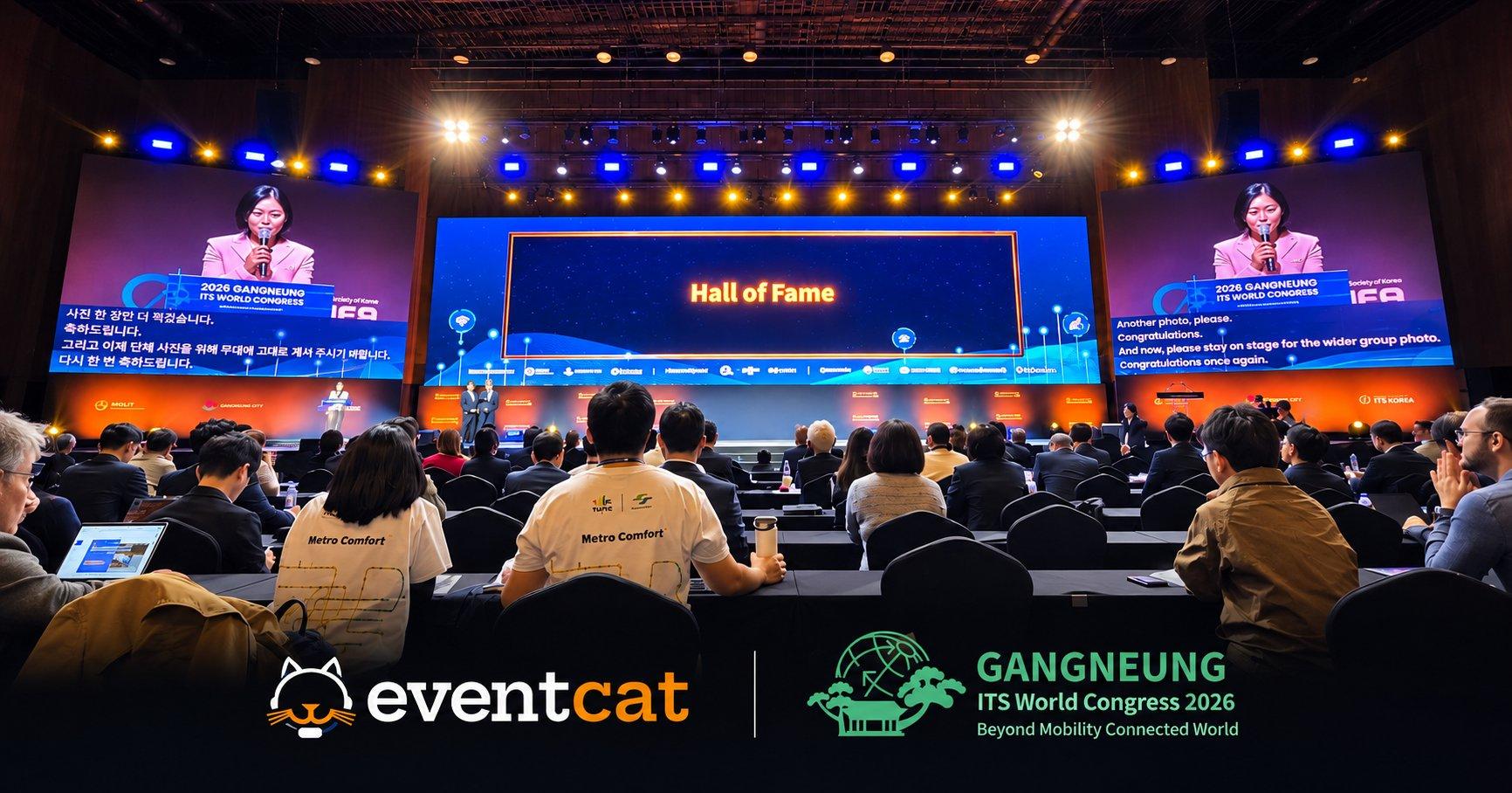
In the main hall, translated captions ran on the live broadcast screen, much like TV closed captions. Attendees followed the speaker and the Korean and English captions in the same place, without reaching for a device. For keynotes with large audiences, this is the lowest-friction option.
Plenary session broadcast screen with Korean–English captions (Federal & State Coordination session)
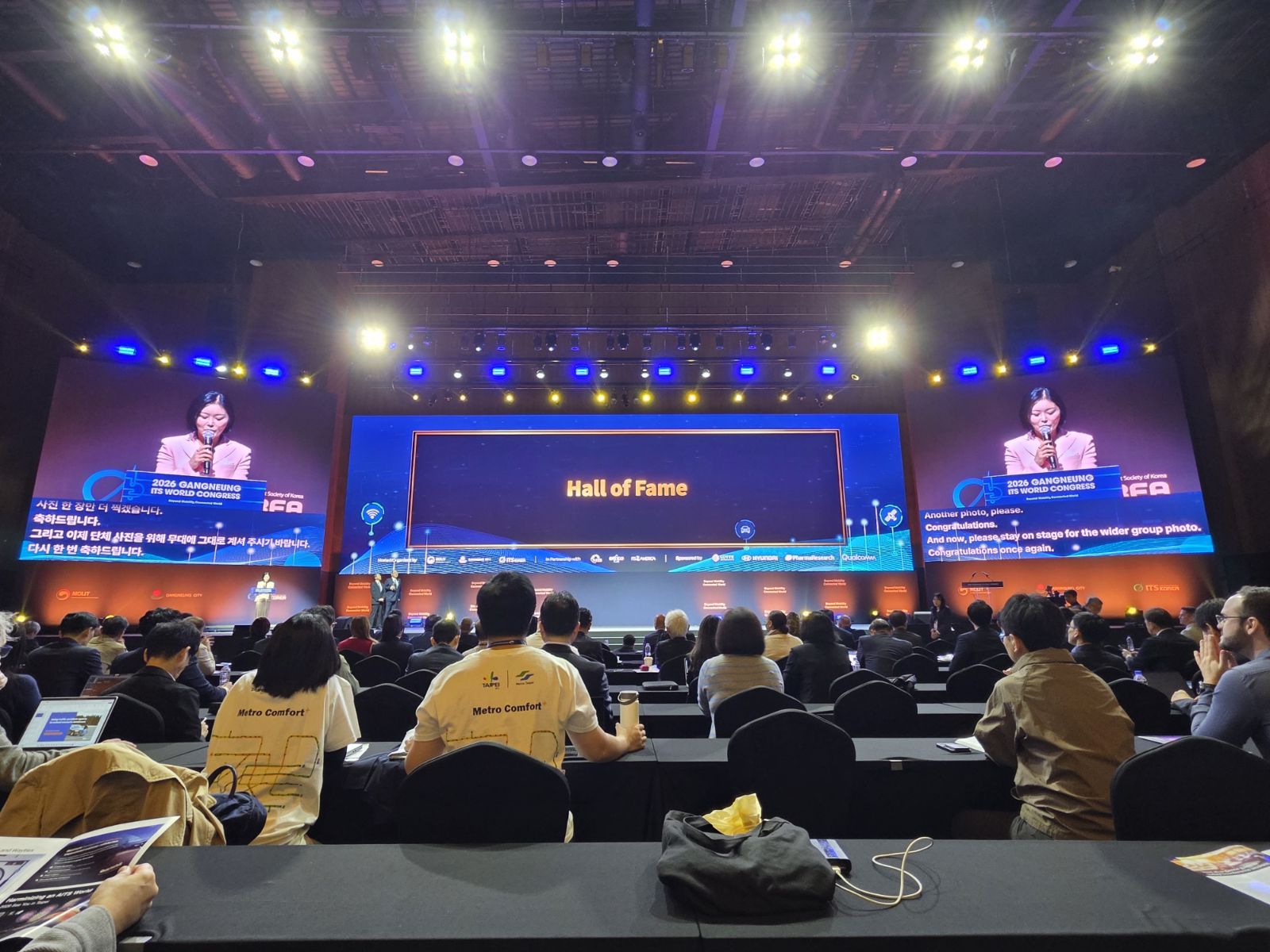
EventCAT real-time Korean–English captions on the plenary broadcast screen at ITS World Congress 2026
Breakout Rooms: Floating View on a Single Screen
Most breakout rooms have one projector. Showing slides and captions together usually means renting and configuring a screen splitter for every room.
EventCAT's floating view places the caption window directly over the slides or video. One screen, no extra hardware, and setup simple enough to repeat across a dozen rooms in a morning.
Youth Sessions: A Dedicated Caption Monitor
For youth sessions, the team placed an additional monitor next to the stage that showed translated captions only. With nothing competing for screen space, the text could be larger and easier to read from the back of the room, a good fit for students and early-career researchers following detailed presentations.
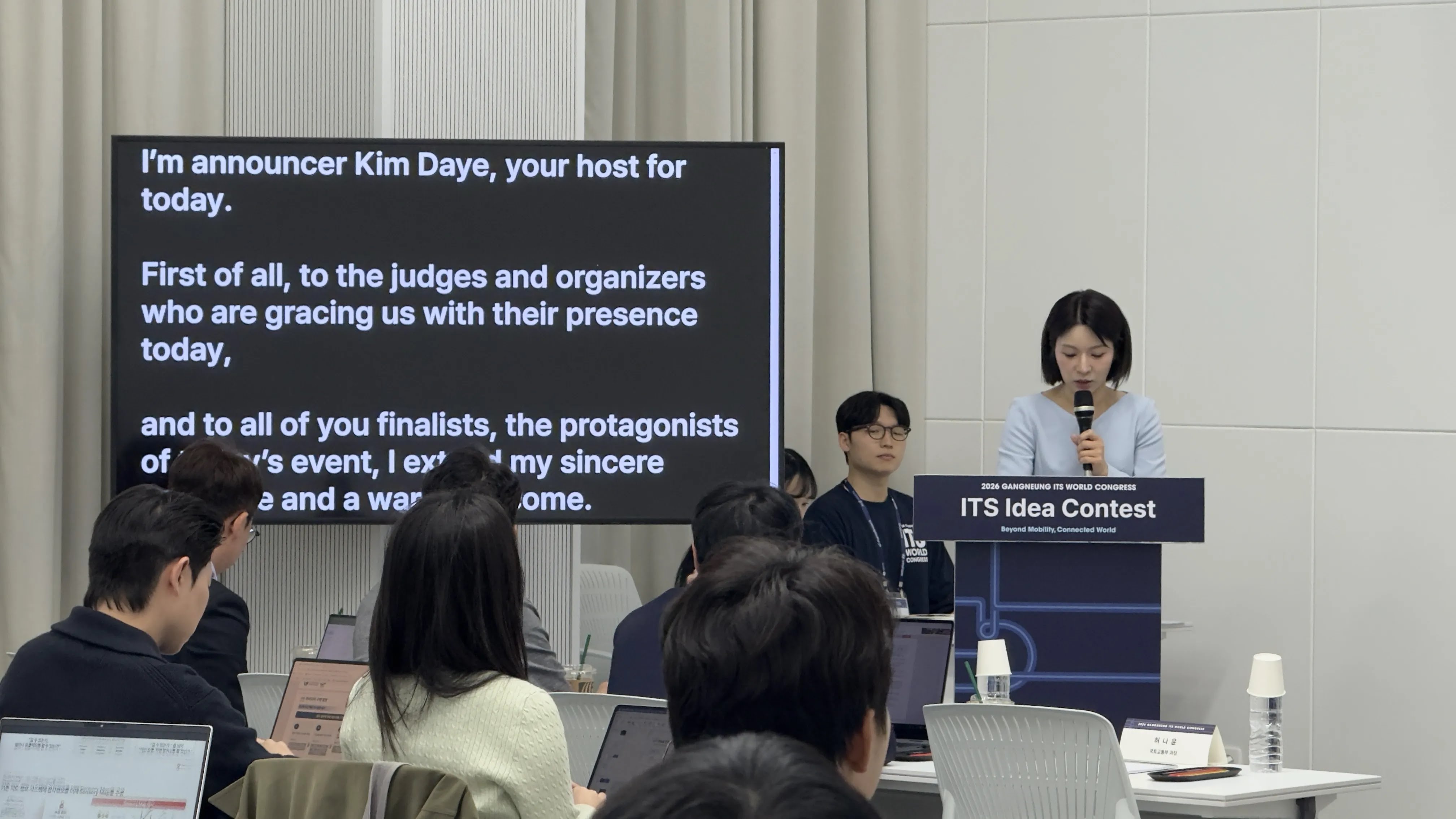
ITS Idea Contest (October 22), dedicated caption monitor in view. EventCAT translated captions on a dedicated monitor during a youth session at ITS World Congress 2026
What Conference, Forum, and Workshop Organizers Can Take Away
ITS World Congress 2026 shows that real-time AI translation can cover a multi-track international conference with a lean team and minimal hardware:
More sessions, more value. One account covers every room and every day, so complexity does not grow with each breakout you add.
New venue, no problem. EventCAT ran in a convention center hosting its first major event, with no booth installation.
One tool, three room setups. Broadcast captions for the plenary, floating view for single-screen rooms, a dedicated monitor where readability matters most.
Your team can run it. Your AV technician or event staff operate it through a simple interface, backed by live online support from EventCAT.
Whether you are planning a 3,000-delegate congress or a two-room workshop, the goal is the same: no attendee misses a session because of language, and your operations team does not grow to make that happen.
Frequently Asked Questions
Q. What do I need to add real-time AI translation to an academic conference?
An audio feed from the speaker's microphone and a screen to show captions, or your attendees' own phones. EventCAT connects to your existing sound and video setup without booths or receivers, and attendees can scan a QR code to follow captions or audio on their devices.
Q. Do we need EventCAT staff on site?
No. The interface is designed for your AV technician or event staff to run, and EventCAT provides real-time online support before and during your event.
Q. Can EventCAT handle concurrent breakout sessions?
Yes. At ITS World Congress 2026, one EventCAT Conference account ran 18 concurrent sessions for five days, all monitored from a single screen.
Q. Our breakout rooms only have one projector. Where do the captions go?
Floating view places the caption window over your slides or video, so you do not need a screen splitter.
Q. How accurate is it with technical terminology?
Loading key terms and acronyms into the Glossary before the event improves accuracy and consistency. At ITS World Congress, it was used for transportation terms such as C-ITS and MaaS.
Q. How many languages are supported?
EventCAT supports real-time captions in more than 50 languages, and you can set different languages for each session, for example English and French for a Canadian program.
Bring Real-Time AI Translation to Your Next Conference
If you are planning a conference, symposium, association meeting, or workshop with parallel sessions, explore EventCAT Conference. Contact us to talk through your room setup, or try EventCAT for free.