
Right after you arrive on site
Here's how to route all the sound in the venue into EventCAT. Set up the audio signal path step by step, from the mixer to the laptop.
Right after you arrive on site
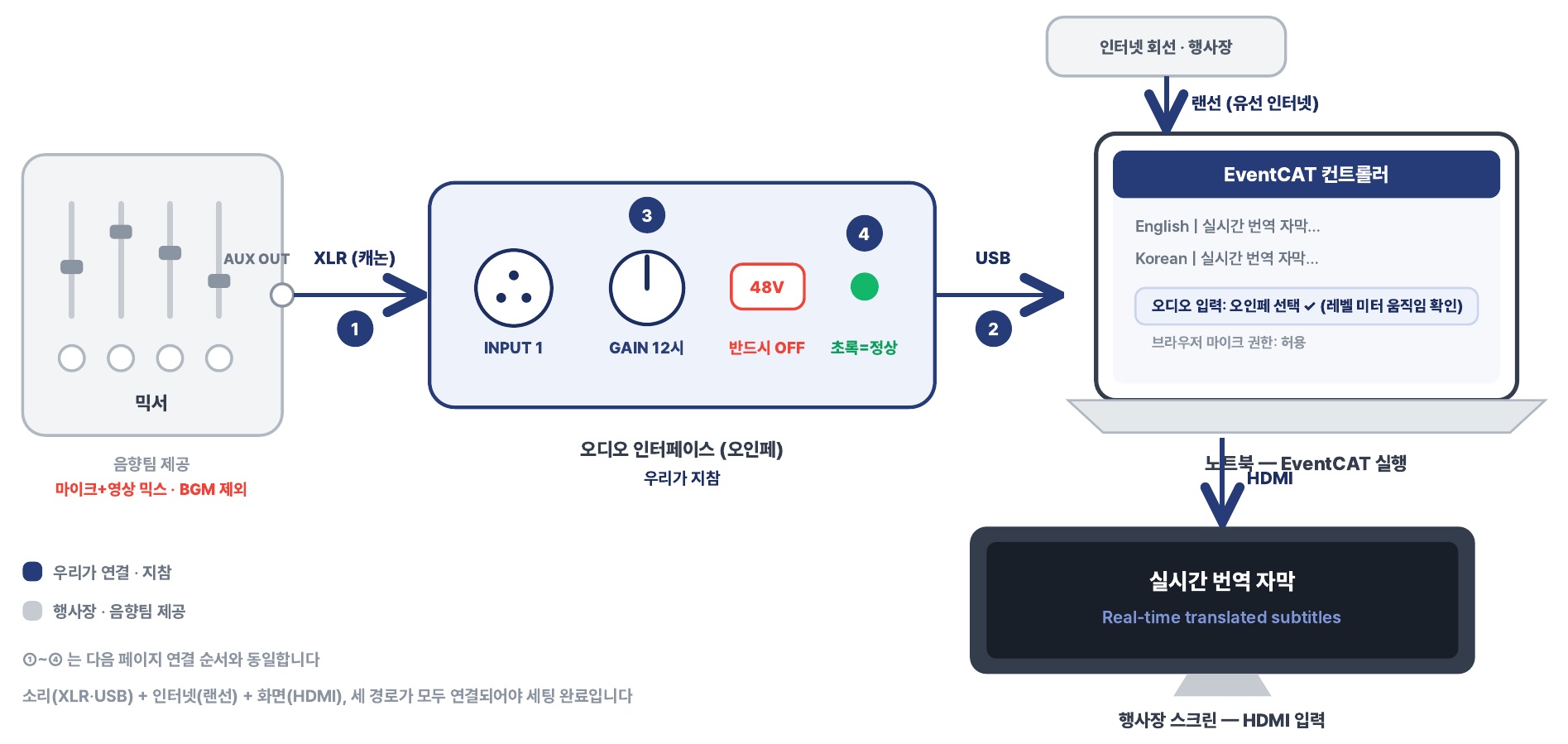
Mixer → XLR → Audio interface → USB → Laptop (running EventCAT) → HDMI → Venue screen (HDMI input)
- XLR: Mixer AUX OUT → Audio interface INPUT 1
- USB: Audio interface → Laptop
- GAIN at 12 o'clock
- Green = OK (48V must be OFF)
- Mixer — Provided by the AV team. Mic + video mix, no BGM
- Audio interface — We bring it
- Internet line · Venue — Connect to the laptop with a LAN cable (wired internet)
- EventCAT controller — Audio input: select the audio interface ✓ (check the level meter moves), browser mic permission: Allow
- Venue screen — HDMI input, shows real-time translated subtitles
Legend: Connected/brought by us / Provided by the venue or AV team
①–④ match the connection order on the next page.
Setup is complete only when all three paths are connected: sound (XLR, USB), internet (LAN cable) and display (HDMI).