
CASE 2 · Vertical LED screens
CASE 2 · Vertical LED screens
- Open the EventCAT Live View in your browser.
- In Screen customization (Custom) → Content width (px), reduce the value to fit the vertical screen's ratio. Only the subtitle area narrows and the setting is kept, so this is the most reliable option.
- Hand the screen to the screen director over HDMI or as an extended display.
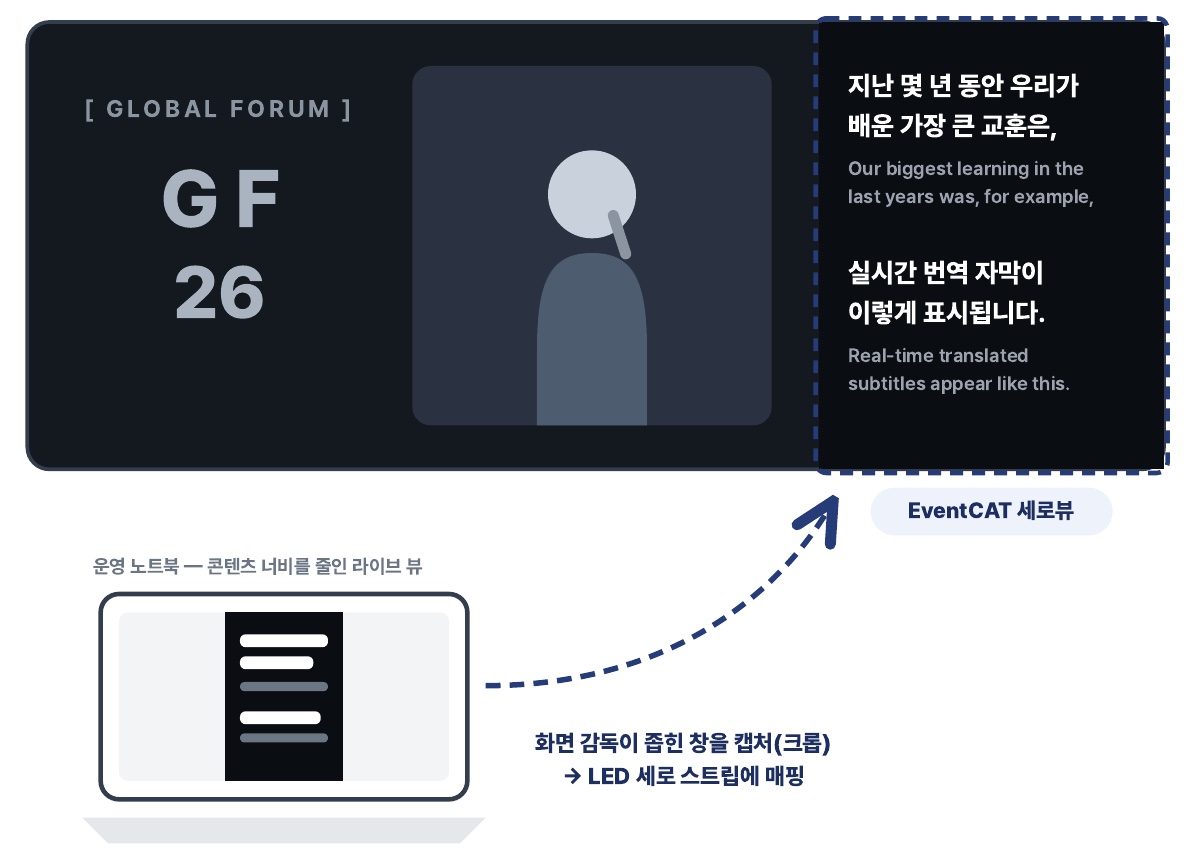
- The screen director captures (crops) the subtitle area and maps it to the vertical LED strip.
- For several languages, open a separate tab for each language and map each one to its own strip.
Alternative — Narrow the window
If you can't use Content width, you can narrow the browser window yourself. The layout is responsive, so subtitles reflow automatically.
Diagram labels: Operator laptop — Live View with reduced content width · Screen director captures (crops) the narrowed window → maps it to the vertical LED strip · EventCAT vertical view
Tip Prepare 2–3 backup tabs with the same ratio in advance. If the ratio gets off, you can switch to a backup tab right away.